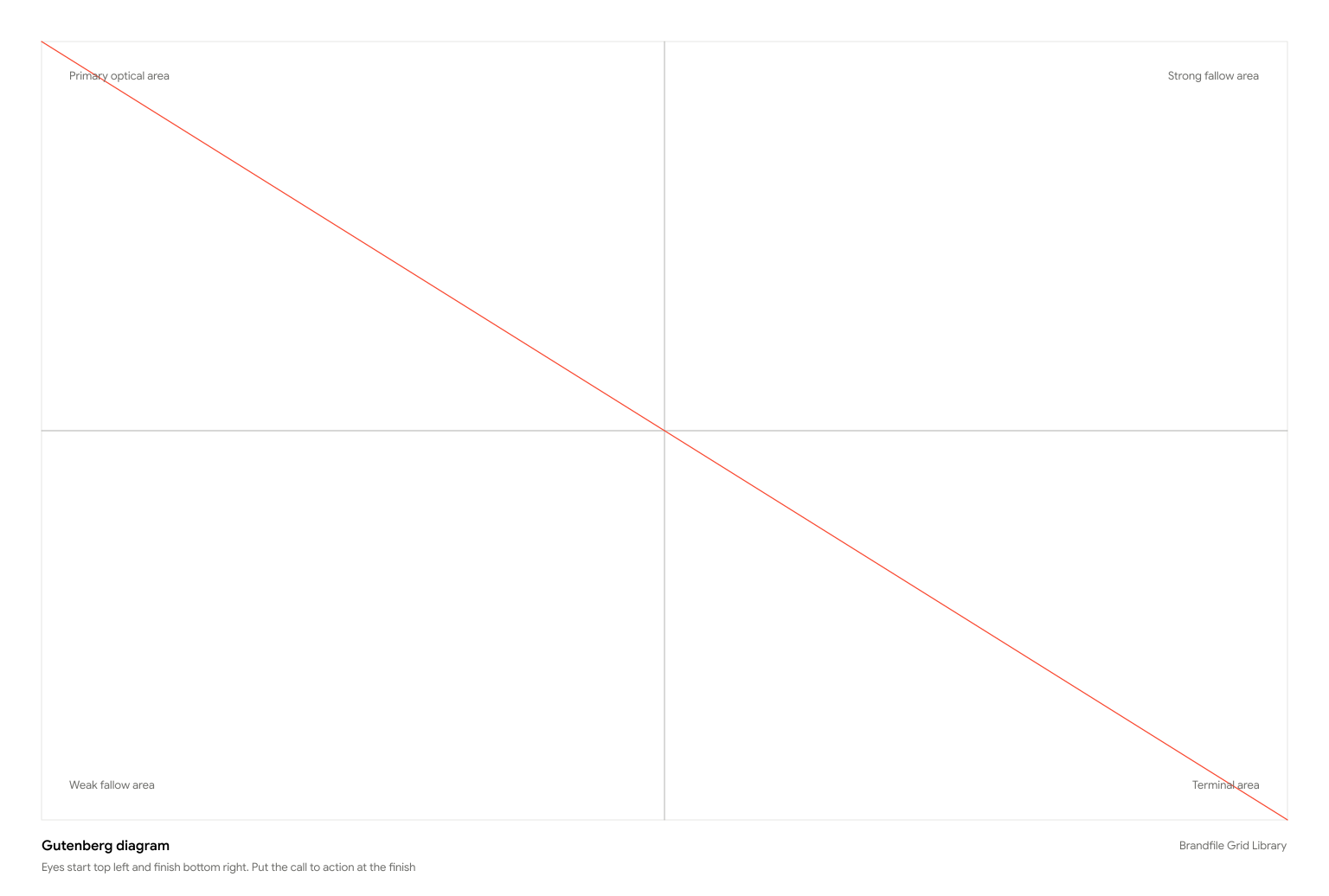
Gutenberg diagram
The Gutenberg diagram splits an even page into four areas. Eyes enter at the top left, the primary optical area, and leave at the bottom right, the terminal area.
Free for personal and client work. Opens in Illustrator, Affinity, Figma and Inkscape.
What it's for
- Placing a logo top left and the call to action bottom right
- Even, text-heavy pages
- Print ads and posters
How to draw it
- Divide the page into four quarters.
- Mark the top left as the primary optical area.
- Mark the bottom right as the terminal area.
- Draw the diagonal the eye follows between them.
- Put the key message at the start and the action at the end.
When not to use it
It describes even pages. Strong images or colour pull the eye elsewhere, so test real layouts.
What's in the file
One SVG, 1536 by 1036, with four named layers, so you can lock the grid and draw above it:
- Frame: the edge of the grid.
- Construction: the grid lines, in warm grey.
- Accents: the lines and points that matter most, in coral.
- Labels: the name and a short note, as outlines. Hide it while you draw.
Get all 54 grids
The whole Grid Library in one ZIP: every grid in 8 numbered folders, with a README that names each one. We email it to you, free.
Do it on your own logo
Brandfile's Layouts step places your logo on 11 formats by one rule, so every layout starts from the same place. See Layouts.