Logo package generator
The client never asks for another file.
One upload becomes a sorted logo package: every version and format, icons for the web and phones, social images, and a Start here page that tells your client which file to use.
Preview on Free. Download on Pro.
- Start here.html
- 01 Logo40
- brandfile-logo-full-colour.svg
- brandfile-logo-full-colour-512px.png
- brandfile-logo-full-colour-1024px.png
- brandfile-logo-full-colour-2048px.png
- brandfile-logo-full-colour.webp
- and 35 more
- 02 Logo mark40
- 03 Icons10
- 04 Social4
- 05 Construction2
- 06 Patterns14
Exporting every colour, size and format by hand takes hours. Then the client still asks which file goes where, and loses the ZIP a year later.
How it works
Upload
Drop the same SVG you used for Grids. Brandfile finds the mark and the brand colours.
Choose
Pick formats, versions and sizes. The preview shows the package folder by folder.
Download
One ZIP with every file named and sorted, built right in your browser.
What Pack does
Finds the mark for you
Brandfile spots the symbol in your logo and exports it on its own, for favicons, app icons and profile pictures.
Ready for print
CMYK PDF and EPS files are drawn from the exact vector paths, so print shops and sign makers get what they ask for.
Explains itself
A Start here page in the ZIP shows each file and what it is for, with your brand colours in HEX, RGB and CMYK.
In the app.
The real Pack step, on a client logo.
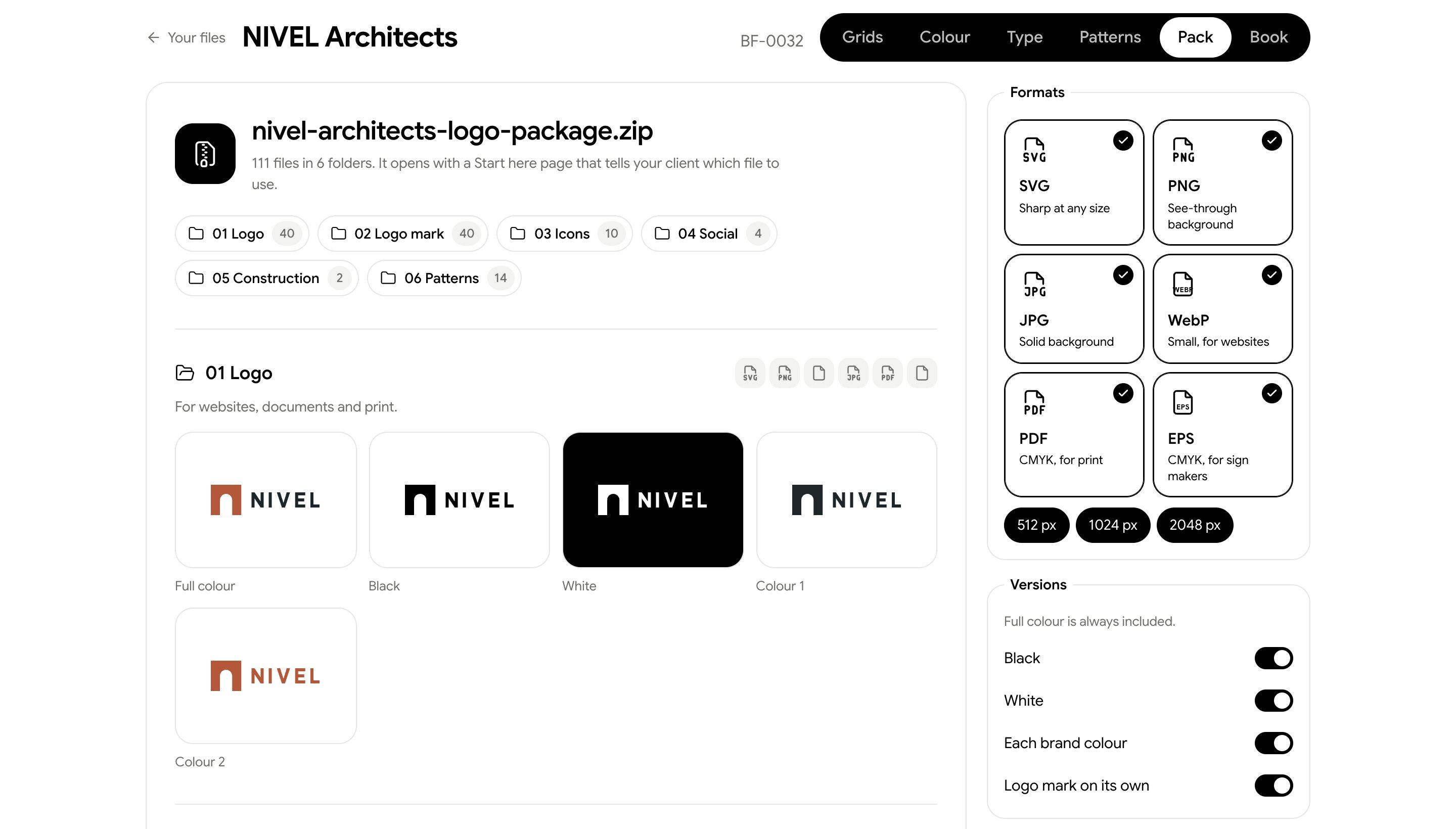
- The package, named for the brand, with its file count
- Numbered folders, in the order a client needs them
- Every colour version: full colour, black, white and each brand colour
- The formats to include, with what each is for
What people use Pack for
Every detail
Everything Pack does today.
- Full colour, black, white and each brand colour
- On light and on dark versions, in your own brand colours
- The logo and the mark on its own
- SVG, PNG at 512, 1024 and 2048 px, JPG and WebP
- CMYK PDF and EPS from the exact paths
- favicon.ico, Apple touch icon and app icons
- Profile pictures, a cover image and a LinkedIn banner
- Folders by use or by file type
- A Start here page and colour codes
- Mockups and layout guides, when you switch them on
- Built in your browser, nothing uploaded to make it
Pack questions
How many files are in a package?
It depends on your choices. Open the sample to see a full one, folder by folder.
Are the print files really CMYK?
Yes. The PDF and EPS files are written in CMYK from your logo's exact paths, not converted from a picture.
What if my logo has no separate mark?
Then the icons and profile pictures use the whole logo, and the package skips the mark folder.
Can I rename the brand colours?
Yes. Name each colour and the names appear on the Start here page.
Every step, one upload.
Every tool reads the same SVG, so the grid, colours, fonts, patterns, layouts, mockups, files and book always match.
- GridsConstruction sheets from your real artwork
- ColourBrand colours with codes that print right
- TypeBrand fonts, checked on your colours
- PatternsBrand patterns made from your mark
- LayoutsGrids and logo placement for every format
- MockupsYour logo on screens, phones and paper
- PackEvery logo file, named and zipped
- BookA short brand book, ready to send
- PresentOne client deck for one to three concepts
- PortalOne private link for your client