Akrivi Gridit alternative: Brandfile vs Akrivi
Pick Akrivi Studio if you live in Illustrator and want editable presentation and guideline layouts inside it. Pick Brandfile if you want the grid, print colours, fonts, patterns, every logo file, a brand book and a client deck from one SVG, in any browser, with a free plan, a 14-day refund and no Illustrator subscription.
Akrivi Studio's tools are now called Logo Grids, Brand Guidelines, Logo Presentations, Bento Grids, Logo Exports and Brand Hub. Earlier names were Gridit, Guideit, Presentit or Presenta, and Exportit.
Side by side
| What | Akrivi Studio | Brandfile |
|---|---|---|
| Where it runs | Inside Adobe Illustrator 2021 to 2027, on macOS and Windows. Its site says it runs best on macOS | Any desktop browser, on any computer. Nothing to install |
| Design apps | Illustrator only. Its site doesn't list Figma or Affinity | Any app that exports SVG: Illustrator, Figma, Affinity, Inkscape, CorelDRAW, Sketch |
| What you also pay for | An Adobe Illustrator subscription | Nothing else |
| Price | One yearly subscription. Its site doesn't show the price before checkout | Free for 3 files. Pro is $8 a month or $69 a year, tax handled by Paddle |
| Trial | 14 days free, then charged unless you cancel | Free plan for as long as you like, no card |
| Refunds | None once the trial ends. A renewal charged by mistake is refunded if you ask within 7 days | Full refund within 14 days of your first payment |
| Computer | Up to 2 devices you own | A desktop browser. Sign in on any computer |
| Logo files | Logo Exports has a waitlist. Early access goes to existing subscribers first, date not set | Live: a full package in 6 formats with icons, social images and a Start here page |
| Colour codes | HEX, RGB and CMYK shown | HEX, RGB, CMYK through real print profiles, nearest Pantone and RAL |
| Presentations | Logo Presentations: 10+ editable pages per concept, up to 3 concepts | Present: a 10-slide deck per concept with flat mockups, up to 3 concepts |
| Bento grids | Bento Grids, inside the plan | A brand board from your logo in the Book, Present and Pack, plus a free bento grid generator |
| Your logo | Stays on your computer, inside Illustrator | Measured with geometry, not AI. Saved only to your private account, never shared or used to train anything |
Logo Grids vs Grids
Both find the construction in a finished logo. Akrivi's Logo Grids (once called Gridit) draws it as Illustrator artwork. Brandfile reads the exact paths in your SVG and draws a sheet you can export or keep editing.
| What | Akrivi Studio | Brandfile |
|---|---|---|
| Grid types | Base, construction and clear space grids | Construction circles, edge lines, alignment guides, bounding box and centre, clear space, plus base grids |
| Base grids | Base grids, types not listed | Square (by box count or size), golden ratio with spiral and circles, isometric and hexagon |
| Angles | Not stated | The isometric grid can turn to match the main angle in your logo |
| Circle accuracy | Described as precise, with no figures given | Circles come from your exact curves and arcs, merged so each curve shows one circle |
| Anchor points and handles | Anchors, handles, outlines, gridlines, circle paths and measurements in one click | Every anchor point and Bezier handle, drawn from the exact paths, with a slider for how many points show |
| Checking the drawing | Says it catches alignment and spacing issues | The Drawing check lists near misses with numbers: an edge at 44.6 degrees, two points a hair apart, uneven handles, near-twin circles, kinks |
| Lockup check | Detects the logomark | Measures the gap, wordmark size and alignment against the mark, and can fix the spacing on a copy |
| Clear space | Defined in one click | As a share of the logo, or as the height or width of one part, like the letter b, drawn in x units |
| Customising the grid | You adjust grids in Illustrator as the design changes | Colour, weight, dash and opacity for every layer, line weight, label size and a studio look for new files |
| Sensitivity | Not stated on the current page | One setting, from fewer and cleaner to more and finer |
| Sheet styles | Your own Illustrator styling | Light, dark and blueprint, with the logo as ghost, solid, outline or original |
| Export | Illustrator artwork | A 2400 px PNG and an editable SVG for any app |
| Free use | Within the 14-day trial, or the free grid templates on Gumroad | Free on 3 files, with a small credit on the sheet |
| Grid tool on its own | Logo Grid Generator Lite, $39 once on Gumroad | Grids is part of Pro, and free on 3 files |
Brand Guidelines vs Book
Akrivi's Brand Guidelines (once called Guideit) lays out guidelines in Illustrator from templates. Brandfile's Book is built from what every other step already knows about the logo, so the colours, fonts and rules always match.
| What | Akrivi Studio | Brandfile |
|---|---|---|
| Templates | Several styles today, with more added in updates | 14 templates, from Standard and Swiss to Technical, Poster and Document |
| Page shapes | Not stated | Landscape 16:9, A4 portrait and landscape, US Letter, square, and a one-page poster |
| Sections | Smart sections sort your assets into pages | Introduction, logo, versions, mark, how it's built, clear space and size, colour, typography, patterns, don'ts and in use, each one on or off |
| Logo don'ts | Built-in logo do's and don'ts | Don'ts drawn from your own logo: stretched, rotated, recoloured and more |
| Your own words | Copy changes through Apply Changes | An introduction and a short note on every page |
| Colour codes | HEX, RGB and CMYK | HEX, RGB, CMYK through the print profile you chose, nearest Pantone and RAL |
| Typography | Any font installed in Illustrator | Over 2,000 free fonts with weights and a size scale, checked for contrast on your brand colours |
| Construction page | Not stated | The construction sheet from Grids |
| Patterns page | Not stated | Your brand patterns from Patterns |
| Editing | Fully editable inside Illustrator | Settings and words in Brandfile. Copy a page as vectors into Figma, or take the InDesign file with live text and swatches |
| Export | PDF, a Google Drive folder, or online through Brand Hub | Vector PDF, PNG and SVG pages, an InDesign package, a shared guidelines web page through Portal, and the book can go into the logo package |
Logo Exports vs Pack
Akrivi's Logo Exports (once called Exportit) has a waitlist, with early access for existing subscribers first. Brandfile's Pack is live today.
| What | Akrivi Studio | Brandfile |
|---|---|---|
| Available | Waitlist. Early access for existing subscribers first, date not set | Live |
| Formats | SVG, PNG, JPG, AI, EPS and PDF | SVG, PNG, JPG, WebP, PDF and EPS |
| Print files | RGB and CMYK | CMYK PDF and EPS written from the exact paths, colours converted through real print profiles |
| Colour versions | Colour, inverted, black, white and greyscale | Full colour, black, white, each brand colour and greyscale, with white cut-outs kept see-through |
| Logo parts | Logomark, logotype, full logo, wordmarks, lockups and alternatives | Full logo and the mark, found and cut out for you |
| PNG sizes | Any size you set | 512, 1024 and 2048 px, plus up to 6 widths of your own |
| Web and app icons | Not listed | Favicons and app icons |
| Social images | Not listed | Profile pictures and banners |
| Extras | A logo file guide | A Start here page and README with colour codes, palette files (CSS, SCSS, JSON, ASE, PDF), a fonts guide, the construction sheet, patterns, layout guides with a logo size table, mockups, and the brand book and deck as PDFs |
| Folders | An organised folder structure | Sorted by use for clients, or by file type for designers |
| Sharing | A local, Google Drive or Dropbox folder, and one link through Brand Hub | One ZIP made in your browser |
| Try before you pay | Within the 14-day trial | Preview every file free |
Logo Presentations vs Present
This is where Akrivi is stronger today. Its Logo Presentations (once called Presentit) makes decks of 10+ pages per concept, fully editable in Illustrator, for up to 3 concepts. Brandfile's Present makes a 10-slide deck with mockups, also for up to 3 concepts, set up in Brandfile rather than edited freely.
| What | Akrivi Studio | Brandfile |
|---|---|---|
| Concepts | Up to 3 per presentation | Up to 3 per presentation, one file each, with the logos side by side |
| Pages | 10+ per concept, as Illustrator artboards you can add to | 10 slides: cover, the idea, the logo, how it's built, colour, on paper, on screen, in the world, pattern and next steps |
| Mockups | Applications pages, mockups not described | Business card, letterhead, website, app icons, profile picture, sign and banner, drawn flat in the brand's colours |
| Studio branding | Your name, logo and contact details on every page, saved for later projects | Your words on the cover, the idea and the next steps |
| Editing | Text, colours, images and layouts editable in Illustrator | Words and slides chosen in Brandfile |
| Export | PDF from Illustrator | 16:9 vector PDF and PNG slides |
Steps Akrivi doesn't have
Brandfile's other steps read the same SVG, so everything you hand over matches.
| What | Akrivi Studio | Brandfile |
|---|---|---|
| Colour step | Not offered | Find, name and lock brand colours, with CMYK through 5 real print profiles and plain advice on which text reads on each colour |
| Type step | Not offered | Pick 1 to 3 brand fonts, see them on your colours, and get a size scale and contrast checks by size and weight |
| Patterns step | Not offered | Repeat, supergraphic, halftone, scatter and texture patterns made from your mark, as tiles that repeat without seams, and backgrounds |
| Layouts step | Not offered | Grids for 11 formats with the logo placed by one rule, a logo size table, and grid settings for Figma and InDesign |
| Mockups step | Not offered | Browser tab, website, iPhone, Mac Dock, Android, social profile, business card and letterhead, drawn from your logo at real sizes |
| Free tools | Free logo grid templates on Gumroad, which it says 16,000 designers have downloaded | HEX to CMYK, HEX to Pantone, HEX to RAL, contrast checker, font pairing, logo SVG checker, clear space tool, image effects and more, free without an account |
Price, trust and support
| What | Akrivi Studio | Brandfile |
|---|---|---|
| Cheapest way to start | A 14-day trial, or the free grid templates | The free plan, no card |
| Year one cost | The yearly plan plus an Illustrator subscription | $0 on Free, or $69 a year for Pro |
| Refund | None after the trial, except a renewal charged by mistake, within 7 days | 14 days on your first payment |
| Updates | Continuous updates in the plugin | New features arrive in the browser, nothing to update |
| AI | Not stated | No AI. Logos are measured with geometry code |
| Your logo | Never leaves your computer | Measured in your browser, saved only to your private account, never shared, never used to train anything, deleted when you delete it |
| Help | An FAQ on its site | Searchable Help and a contact form that sends your plan and browser for you |
Where each is stronger
Akrivi Studio
- It works on your Illustrator artboard, so your logo never leaves your computer and everything stays editable in Illustrator.
- Logo Presentations makes editable decks of 10+ pages for up to 3 concepts, with your studio's branding.
- Its guideline layouts stay fully editable on the Illustrator artboard.
- Logo Exports plans AI files, any PNG size, lockup variants, Google Drive and Dropbox folders, and a share link through Brand Hub.
- It has free grid templates and a $39 one-time grid plugin on Gumroad.
- Many designers use it: its site shows 4.8 from 308 reviews and 7,432 designers.
Brandfile
- No Illustrator needed. Figma, Affinity, Inkscape, CorelDRAW and Sketch exports all work.
- A free plan for 3 files with no card, and a 14-day refund on your first payment.
- The logo files ship today, with icons, social images, palette files and a Start here page.
- Print colours through real print profiles, with the nearest Pantone and RAL.
- Golden ratio, isometric and hexagon base grids, and a Drawing check that names each near miss.
- Colour, Type and Patterns steps, all from the same SVG.
- One price you can see: $69 a year, and nothing else to subscribe to.
Try it before you choose
Brandfile is free for 3 files, so you can run a real client logo through it and open every file before you pay. See what a full handoff includes in what files to give a client, or download the sample package made from Brandfile's own logo.
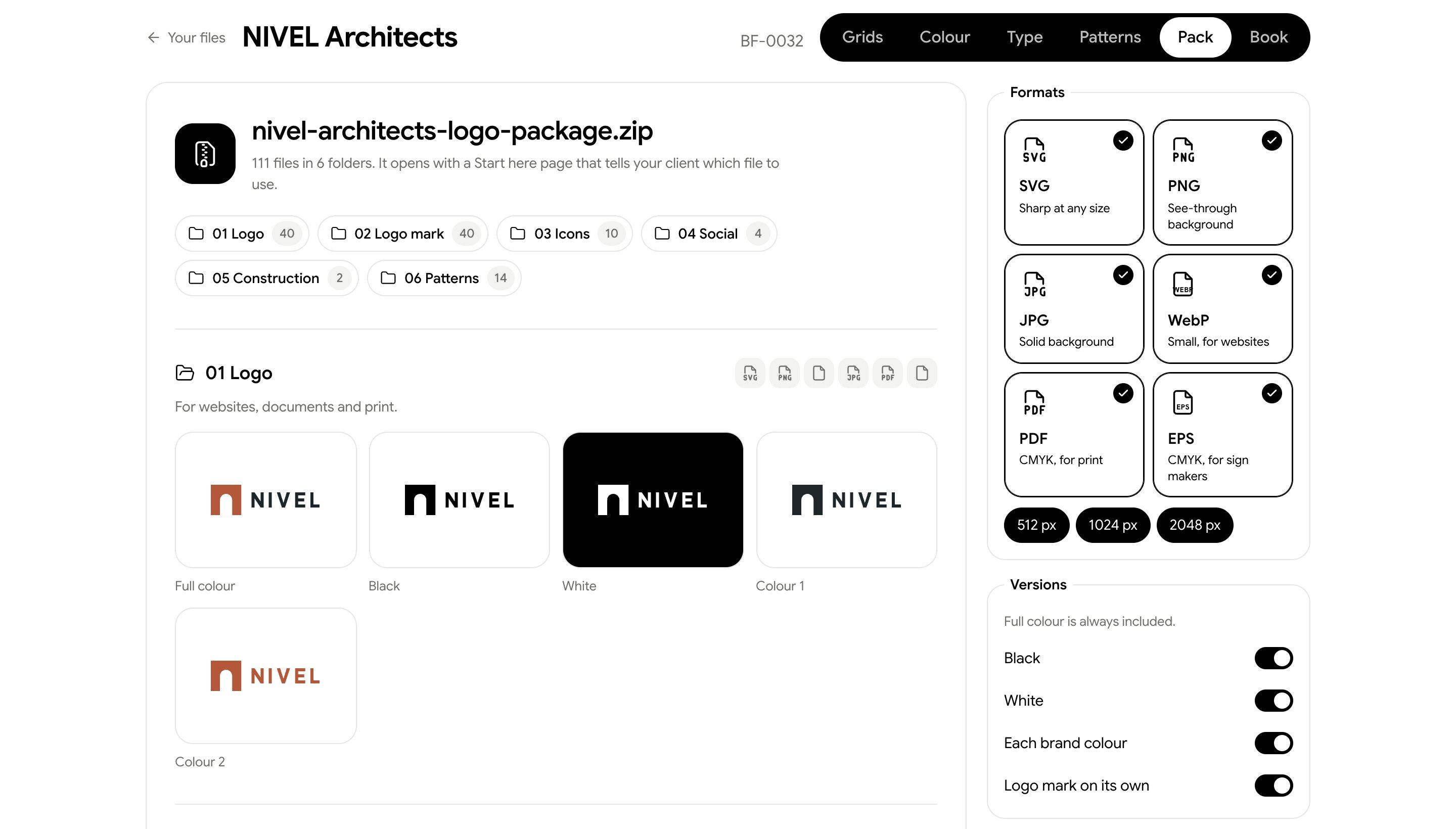
- The package, named for the brand, with its file count
- Numbered folders, in the order a client needs them
- Every colour version: full colour, black, white and each brand colour
- The formats to include, with what each is for
Sources
Facts about Akrivi Studio come from these pages, checked on . Prices and features change, so check them before you buy. Spotted something out of date? Write to hello@brandfile.app.
Ask an AI about this page
Keep reading
Brandfile vs KSDrafter
Pick KSDrafter if you work in Illustrator and want a free or $35 one-time plugin that draws guide shapes around a selected logo.
OpenBrandfile vs GridMe
Pick GridMe if you work in Illustrator and want base grids free, plus construction, clear space and client sheets for $5 a month, on your artboard.
OpenBrandfile vs Logo Package Express
Pick Logo Package Express if you want a one-time price and native Illustrator files from your artboard.
OpenBrandfile vs Logopack
Pick Logopack if you only need the logo files and a short logo guide, at the lowest yearly price or a one-time price.
OpenBrandfile vs Joisti
Joisti hosts the guide, and Brandfile builds the brand behind it, then hosts the guide too.
OpenWhat files to give a client after a logo
The full handoff checklist, formats, colour codes and folders.
Open