Logo file formats explained: SVG, EPS, PDF, PNG and JPG
Use SVG for websites and apps, PDF for print, PNG for documents, slides and social posts, and JPG only where a see-through background causes trouble. Keep EPS for the few print shops that still ask for it. SVG, PDF and EPS are vector, so they stay sharp at any size.
In short
- Vector files (SVG, PDF, EPS) are drawn from shapes and scale to any size.
- Pixel files (PNG, JPG, WebP) are a grid of dots. Make them big enough for where they go.
- PNG can have a see-through background. JPG can't.
- Screen files are RGB. Print files should be CMYK, made on the printer's profile.
- Name each file for what it is, so the client picks the right one without asking.
- Start here.html
- 01 Logo40
- brandfile-logo-full-colour.svg
- brandfile-logo-full-colour-512px.png
- brandfile-logo-full-colour-1024px.png
- brandfile-logo-full-colour-2048px.png
- brandfile-logo-full-colour.webp
- and 35 more
- 02 Logo mark40
- 03 Icons10
- 04 Social4
- 05 Construction2
- 06 Patterns14
Vector and pixel files
Every logo file is one of two kinds. A vector file stores the shapes: this curve, that line, this colour. The computer draws them fresh at any size, so a vector logo is as sharp on a business card as on a building.
A pixel file stores a grid of coloured dots. It looks sharp at the size it was made, and blurry when you stretch it. That is fine for screens, as long as the file is big enough for the place it goes.
Every format, side by side
| Format | Kind | See-through | Use it for | Opens in |
|---|---|---|---|---|
| SVG | Vector | Yes | Websites, apps, Figma and anyone who edits the logo | Browsers and design apps. Not older Word or PowerPoint |
| Vector | Yes | Printers, sign makers and proofs | Every computer and all print software | |
| EPS | Vector | Partly | Older print and sign shops that ask for it | Illustrator and print software only |
| PNG | Pixels | Yes | Slides, documents, social posts, anything on screen | Every app and phone |
| JPG | Pixels | No | Word, email signatures and places that hate see-through files | Every app and phone |
| WebP | Pixels | Yes | Web pages that need small, fast files | Modern browsers. Many desktop apps still can't open it |
- SVG is the web's own vector format. It is small, sharp and easy to edit. It holds screen colours only.
- PDF is the safest file to send anyone. It keeps the vector shapes and can hold real CMYK colours for print.
- EPS is an old print format. It still works, but it handles see-through parts badly and few new apps open it.
- PNG is the everyday pixel file. It keeps a see-through background, so the logo sits on any colour.
- JPG always has a solid background. Use it where a see-through file shows a black or grey box, like some email apps.
Which file for which job
| The job | The file |
|---|---|
| The website | SVG for the logo, PNG or ICO for the favicon |
| A Word file or a slide | PNG with a see-through background |
| An email signature | PNG at about 2 times the size it shows, or JPG |
| A printed card or brochure | PDF in CMYK |
| A sign, a van or a shirt | PDF, or EPS if the shop asks for it |
| Social media | PNG, already sized for each profile and cover |
| Another designer | SVG and PDF, plus the colour codes |
Put this table, in plain words, on the Start here page of the package. Most clients never open a design app, so they need to know which file to drag into Word.
Screen colour and print colour
Screens make colour from light, in RGB. Printers make colour from ink, in CMYK. The same logo needs both: RGB files for screens, CMYK files for print.
Don't let the printer guess. Make the CMYK on a real print profile, like coated FOGRA39 for glossy paper, and write the numbers in the guide. RGB vs CMYK for logos explains why a bright logo can look dull on paper.
Formats you can skip
- TIFF and GIF. PNG does both jobs better for a logo.
- AI, Figma or Affinity files. These are working files, not handoff files. Send them only if your contract says so.
- Tiny PNGs. A 300 px file looks fine in email and blurry on a banner. Start at 512 px and go up to 2048 px.
Making them all at once
Six formats, three or four colour versions and a few sizes add up to dozens of files. By hand, that is an evening of exports. Brandfile's Pack makes them all from one SVG: SVG, PNG, JPG, WebP, PDF and EPS, with print files in CMYK, named and sorted into folders.
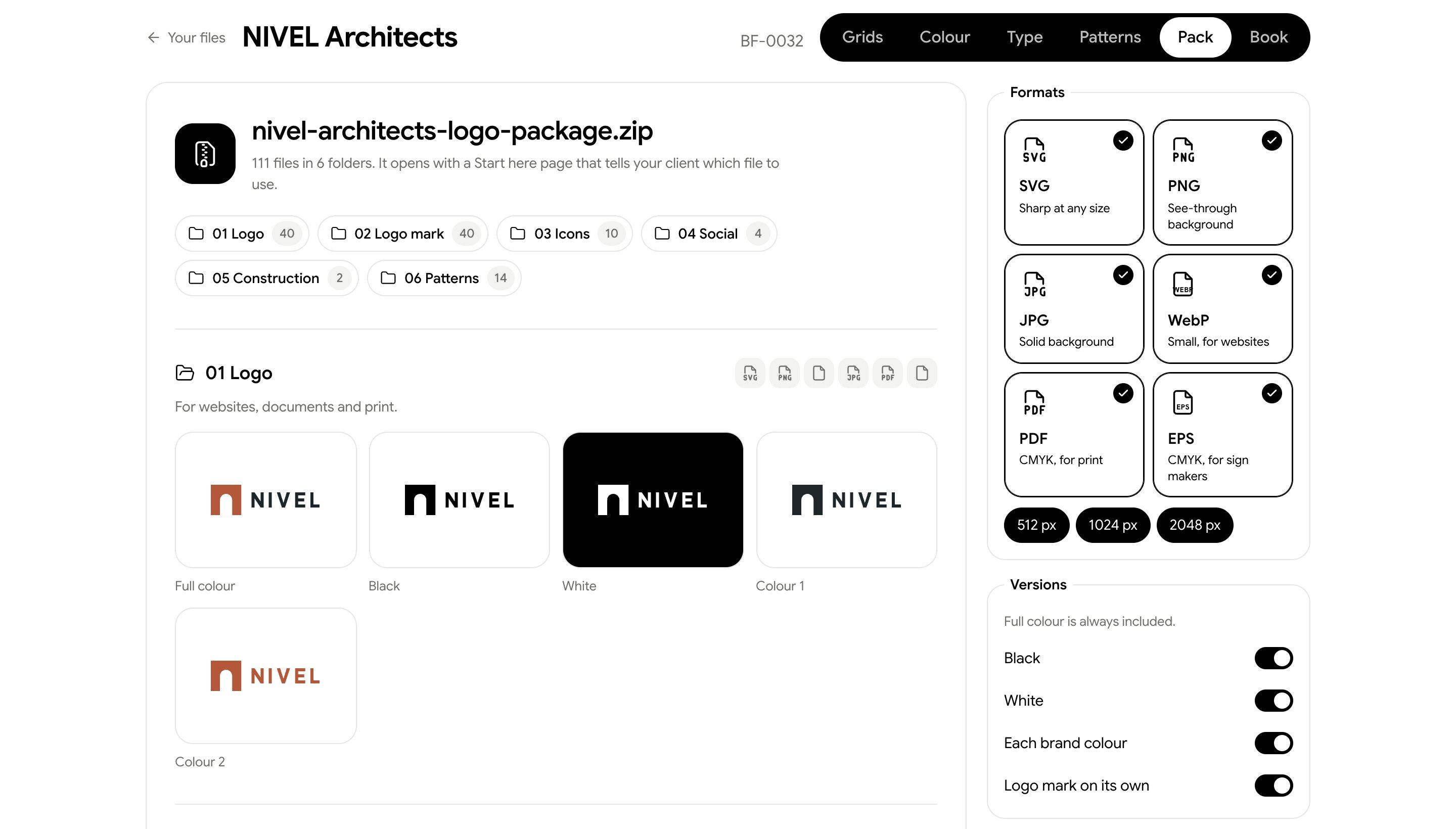
- The package, named for the brand, with its file count
- Numbered folders, in the order a client needs them
- Every colour version: full colour, black, white and each brand colour
- The formats to include, with what each is for
See it on a real logo first: download the sample package, or drop your SVG into the logo package checklist to see every file your logo would get.
Questions
- Which logo format is best?
- There is no single best one. SVG is best for screens, PDF is best for print, and PNG is best for documents and slides. A good package has all three, so the client never has to convert anything.
- Do I still need EPS files?
- Only for older print and sign shops that ask for it. PDF does the same job in almost every modern workflow. Brandfile includes EPS so you have it when someone asks.
- Should I give the client the AI file?
- Only if your contract says so. The working file is yours unless you agreed otherwise. The SVG and PDF already let any designer resize and print the logo.
- What size should the PNG files be?
- 512, 1024 and 2048 pixels wide cover email, documents, web and big screens. Bigger than that, use the SVG or PDF instead.
- Why does my SVG look wrong in Word?
- Older Office versions read SVG badly. Give Office users the PNG file and say so on the Start here page.