HEX to CMYK, on real print profiles.
Converting
Type a HEX colour and get the CMYK numbers to send your printer, converted through a real ICC print profile with Little CMS, the colour engine many print tools use. Formula converters skip the profile, so their numbers can print duller or with the wrong amount of ink.
How it works
Your HEX colour is an sRGB screen colour. Brandfile converts it to the print profile you pick with Little CMS, using relative colorimetric intent and black point compensation, the usual settings for brand colours. Greys and black come out as black ink only, as printers expect, so text and fine lines print sharp.
The second swatch shows the CMYK converted back to the screen: about how the colour will look printed on that paper. Very bright screen colours can't be matched by ink, and the swatch shows you before the printer does.
- Coated paper, ISO Coated v2 (FOGRA39)
- Coated paper, 300% ink limit (FOGRA39)
- Uncoated paper, PSO Uncoated (FOGRA47)
- Uncoated yellowish paper (FOGRA30)
- Newsprint, ISO Newspaper 26
Worked example: formula vs print profile
The same seven colours through the simple formula and through two real print profiles. The formula is close for some colours and far off for others, like purple, teal and navy.
| Colour | Simple formula | Coated, FOGRA39 | Uncoated, PSO |
|---|---|---|---|
| Coral #F94931 | C 0 M 71 Y 80 K 2 | C 0 M 81 Y 82 K 0 | C 0 M 87 Y 99 K 0 |
| Bright blue #1E66F5 | C 88 M 58 Y 0 K 4 | C 87 M 57 Y 0 K 0 | C 90 M 63 Y 0 K 0 |
| Green #2E9E44 | C 71 M 0 Y 57 K 38 | C 78 M 8 Y 92 K 2 | C 76 M 0 Y 100 K 4 |
| Purple #6B3FA0 | C 33 M 61 Y 0 K 37 | C 73 M 83 Y 0 K 0 | C 75 M 96 Y 0 K 0 |
| Teal #00A6A6 | C 100 M 0 Y 0 K 35 | C 76 M 8 Y 38 K 1 | C 79 M 1 Y 36 K 4 |
| Navy #1B2A49 | C 63 M 42 Y 0 K 71 | C 93 M 77 Y 34 K 51 | C 97 M 76 Y 19 K 58 |
| Mid grey #808080 | C 0 M 0 Y 0 K 50 | C 0 M 0 Y 0 K 63 | C 0 M 0 Y 0 K 59 |
Good to know
- Screens differ. The swatches are a guide, and a printed proof is the final word.
- There is no GRACoL or SWOP profile yet, because no free one can be included. Coated FOGRA39 is the closest.
- Pantone is a different system: spot inks, not CMYK. Use the HEX to Pantone tool for the nearest match.
Questions
- Which print profile should I pick?
- Ask your printer first. If they don't say, use coated FOGRA39 for business cards, brochures and packaging on glossy or silk paper, and PSO Uncoated for letterheads, notebooks and books on uncoated paper. Use newsprint only for newspapers.
- Why do different converters give different CMYK?
- Most converters use a simple formula that ignores ink and paper. A print profile describes how real inks behave on a real paper, so the numbers differ, sometimes a lot. Dark blues, purples and teals move the most.
- Can I use these numbers in Illustrator or InDesign?
- Yes. Set the document's CMYK profile to the same one you picked here (Edit, Color Settings in Adobe apps) so the numbers mean the same thing there.
- Is there a GRACoL or SWOP option for US printers?
- Not yet. There is no free GRACoL or SWOP profile Brandfile can include. If your printer works to GRACoL, coated FOGRA39 is the closest of these, and your printer can confirm the final numbers.
Every colour code, for the whole brand
In Brandfile, the Colour step converts your whole palette at once: HEX, RGB, CMYK on your print profile, the nearest Pantone and RAL, and text contrast. The codes go into the logo package and the brand book, so the client always has them. See the Colour step.
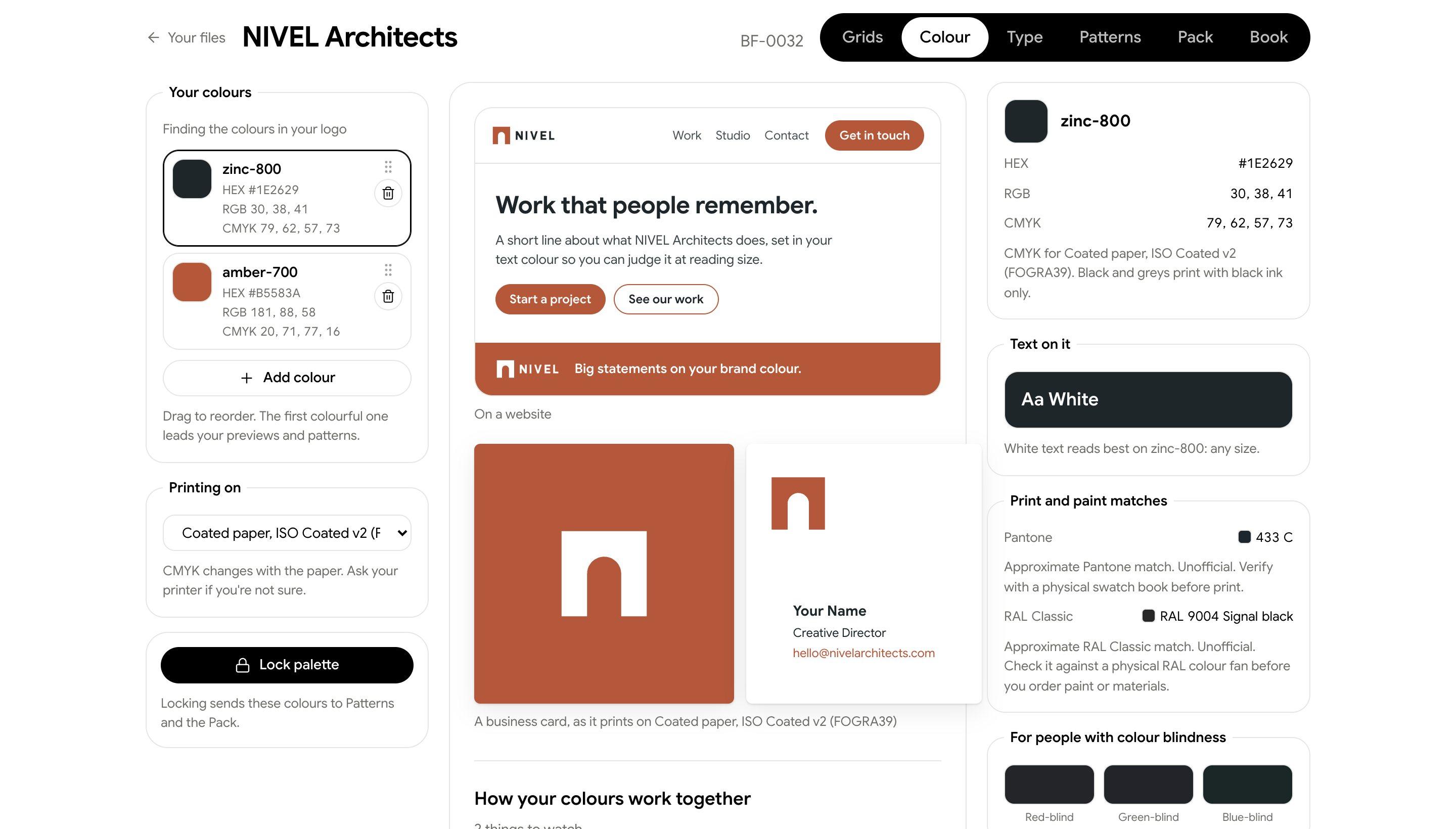
- HEX, RGB and CMYK for every colour
- The print profile the CMYK is made for
- A business card, as it prints on that paper
- Nearest Pantone and RAL, marked approximate