Why HEX to CMYK converters disagree
Most HEX to CMYK converters use a simple formula that knows nothing about ink, paper or the press, so their numbers are a guess. Print software converts through an ICC profile, which describes how real inks behave on a real paper. The two can differ by 40 points on a single ink. Use the profile your printer uses.
In short
- The common formula ignores real inks, paper, ink limits and colours ink can't print.
- An ICC profile, like coated FOGRA39, describes one kind of press and paper. Its numbers are what printers expect.
- The same HEX gives different CMYK on coated and uncoated paper. Both are right, for their paper.
- Ask the printer which profile they use, and put that CMYK in the brand guide.
- When a colour must match exactly every time, use a Pantone spot colour instead of CMYK.
- Purple #6B3FA0Formula C 33 M 61 Y 0 K 37Coated FOGRA39 C 73 M 83 Y 0 K 0
- Teal #00A6A6Formula C 100 M 0 Y 0 K 35Coated FOGRA39 C 76 M 8 Y 38 K 1
- Green #2E9E44Formula C 71 M 0 Y 57 K 38Coated FOGRA39 C 78 M 8 Y 92 K 2
The formula most converters use
Type a HEX code into most online converters and they run the same few lines of maths. They take the brightest of the red, green and blue values, call what is missing from it black, and split the rest into cyan, magenta and yellow. It is quick, needs no files, and gives a tidy answer every time.
The problem is that it describes perfect inks on perfect paper, which no printer has. Its numbers are a rough idea, not instructions for a press.
What the formula misses
| What it ignores | Why it matters |
|---|---|
| Real inks | The formula treats cyan, magenta and yellow as perfect. Real inks are a little dirty, so a profile adds more of each to reach the same colour. |
| The paper | Ink spreads and soaks in, more on uncoated paper. A profile knows how much, and sets the numbers to match. |
| Black | The formula adds black to many strong colours, like the green and teal below, which dulls them. A profile uses black only where it helps. |
| The ink limit | Presses can only take so much ink in one spot, often 300 to 330 percent in total. The formula can go past that. A profile never does. |
| Colours ink can't reach | Screens show colours no ink can print, like a bright RGB blue or green. The formula gives numbers anyway. A profile picks the nearest printable colour. |
How far apart the numbers are
These are the same seven HEX colours through the formula, and through two real print profiles with Little CMS, the colour engine many print tools use. Our HEX to CMYK tool gives the same numbers.
| Colour | Formula | Coated FOGRA39 | Uncoated PSO |
|---|---|---|---|
| Coral #F94931 | C 0 M 71 Y 80 K 2 | C 0 M 81 Y 82 K 0 | C 0 M 87 Y 99 K 0 |
| Bright blue #1E66F5 | C 88 M 58 Y 0 K 4 | C 87 M 57 Y 0 K 0 | C 90 M 63 Y 0 K 0 |
| Green #2E9E44 | C 71 M 0 Y 57 K 38 | C 78 M 8 Y 92 K 2 | C 76 M 0 Y 100 K 4 |
| Purple #6B3FA0 | C 33 M 61 Y 0 K 37 | C 73 M 83 Y 0 K 0 | C 75 M 96 Y 0 K 0 |
| Teal #00A6A6 | C 100 M 0 Y 0 K 35 | C 76 M 8 Y 38 K 1 | C 79 M 1 Y 36 K 4 |
| Navy #1B2A49 | C 63 M 42 Y 0 K 71 | C 93 M 77 Y 34 K 51 | C 97 M 76 Y 19 K 58 |
| Mid grey #808080 | C 0 M 0 Y 0 K 50 | C 0 M 0 Y 0 K 63 | C 0 M 0 Y 0 K 59 |
Purple is the clearest case: the formula asks for 33 cyan and 37 black, the coated profile for 73 cyan and no black at all. Printed from the formula, the purple comes out greyer and darker. Bright blue is the opposite: the formula lands close, because that colour is easy for ink.
What a print profile is
An ICC profile is a file that describes one printing condition: a kind of press, a kind of paper and the inks on it. Converting through it gives the CMYK that prints closest to your screen colour on that paper.
- Coated FOGRA39 (ISO Coated v2) is the usual choice for glossy and silk paper, and many printers in Europe and India use it.
- Uncoated profiles, like PSO Uncoated, suit office paper, letterheads and many books. The same colour needs more ink there and still looks softer.
- GRACoL and SWOP are common in the United States. If your printer is there, ask which one.
Two settings change the numbers a little more. The rendering intent, usually relative colorimetric for brand colours, keeps colours that ink can print as they are. Black point compensation keeps the darkest tones from turning muddy.
Which CMYK to send the printer
- Ask first. One email asking which profile and paper they print on saves a reprint. Many printers will send you their profile file too.
- Put two sets in the brand guide. Coated and uncoated, each labelled with the profile name, cover most jobs a client will order.
- Send print files already in CMYK. A PDF converted on the right profile prints the way you checked it. An RGB file leaves the conversion to whoever opens it.
- Use Pantone when it must match. Packaging, signs and anything printed by different shops over years should use a spot colour. Find the closest one with the HEX to Pantone tool, then check it in a swatch book.
Checking your own colours
Our free HEX to CMYK tool converts any colour on five real profiles and shows the formula result beside it, with a swatch of how the print will look. Brandfile's Colour step does the same for every colour in your logo, writes the numbers into the brand guide and the package, and makes the print files in CMYK on the profile you pick.
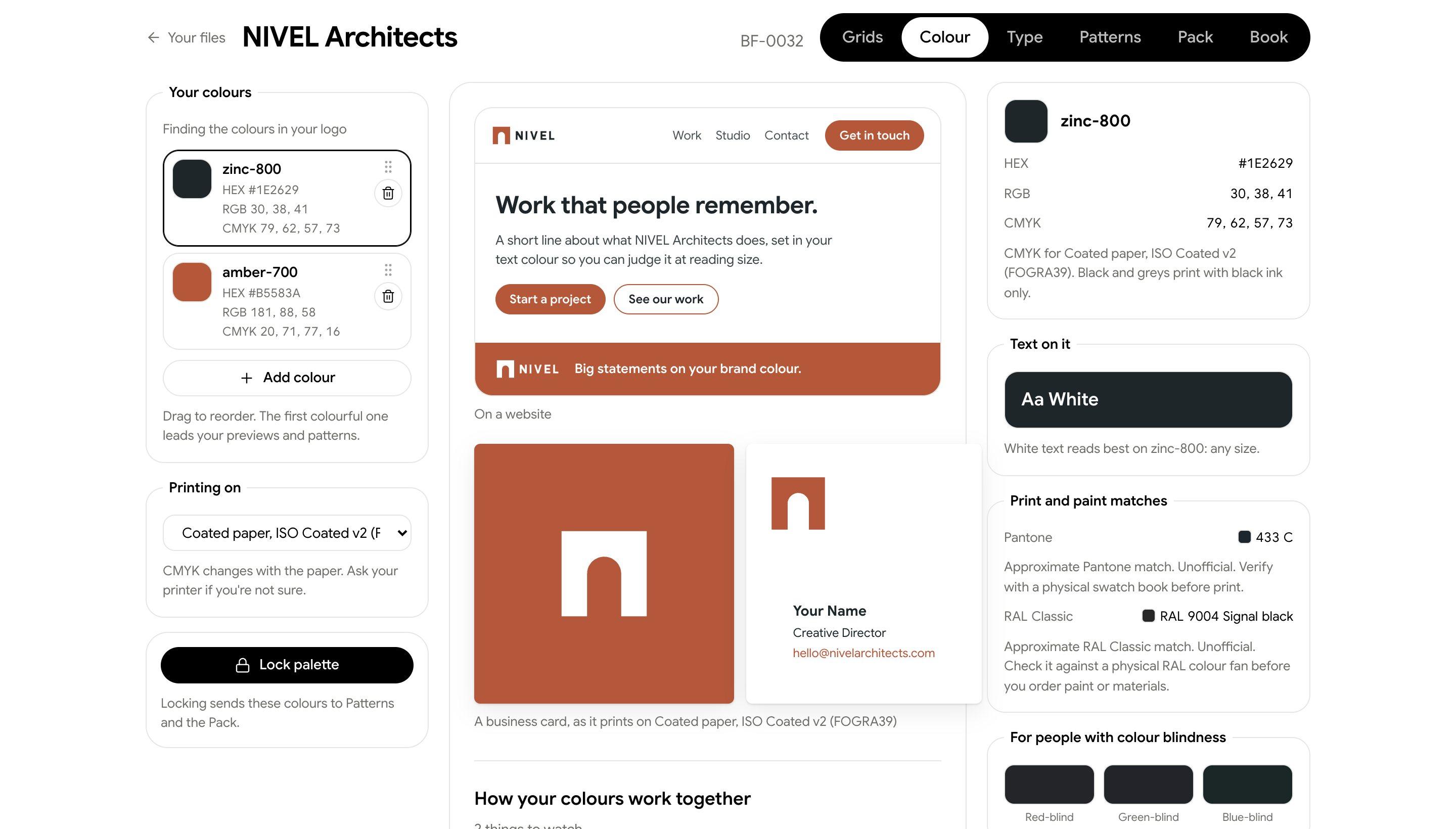
- HEX, RGB and CMYK for every colour
- The print profile the CMYK is made for
- A business card, as it prints on that paper
- Nearest Pantone and RAL, marked approximate
Ask an AI about this guide
Keep reading
HEX to CMYK on print profiles
The CMYK your printer expects, through FOGRA39 and four more real profiles.
OpenHEX to the nearest Pantone
When a colour must match exactly, find the closest Pantone Coated.
OpenWhat files to give a client after a logo
Where the CMYK numbers go in a handoff, and which files use them.
Open